icetana AI Introduces Event Explainability

Explainable AI in Video Surveillance: How icetana AI Adds Context to Security Events
As AI assumes a larger role in security monitoring, understanding why an event was detected becomes just as important as detecting it.
Security teams are no longer just reviewing footage; they are relying on AI to surface unusual behaviour, prioritise attention, and reduce manual monitoring. But without clear context, even the most advanced analytics can slow decision-making instead of accelerating it.
icetana AI Event Explainability bridges that gap. It removes uncertainty from AI-generated events by clearly explaining the behavioural patterns that triggered each event, helping Security Operations Centre (SOC) teams respond faster and with greater confidence.
What Is Event Explainability in AI Video Analytics?
Event Explainability is icetana AI’s way of making automated detection transparent and easy to understand.
Rather than presenting an event with no reasoning, Explainability shows:
- What behaviour was unusual
- How it differed from historical activity
- Where in the scene the unusual pattern occurred
By comparing activity across key time periods such as the previous day or the same time last week, SOC teams gain immediate context around each event.
Key Benefits of icetana AI Event Explainability
Faster Incident Response
Security teams can quickly understand what triggered an event, enabling faster and more confident action.
Clear Context Behind Every Event
Each event includes a short explanation outlining why it was raised, removing the “black box” feeling often associated with AI analytics.
Improved Operational Efficiency
Visual overlays and a green bounding box guide users directly to the relevant area in the scene, reducing time spent searching through footage.
Smarter Decision-Making for SOC Teams
Behavioural comparisons across time periods help teams distinguish between genuine unusual and normal activity patterns.
Greater Trust and Transparency
By making AI decisions easy to interpret, Explainability supports stronger adoption and confidence in automated security monitoring.
How to Use Explainability in icetana AI
Using Explainability is simple and built directly into the workflow.
Step 1: Identify the Event
Locate an icetana AI event in your Highlights.
Step 2: Access the Details
Look for the “?” icon next to the Event Info. This indicates that deep-dive context is available.
Step 3: Review the “Why”
Click the icon to view a short explanation describing why the event was raised.
Examples include:
- “No people were detected here between 15:34 and 18:15 on the same day last week.”
- “3 people were in the scene, 50% more than this time last week.”
Step 4: View the Bounding Area
A green bounding box highlights the exact zone where the event was detected, immediately directing attention to what matters most.
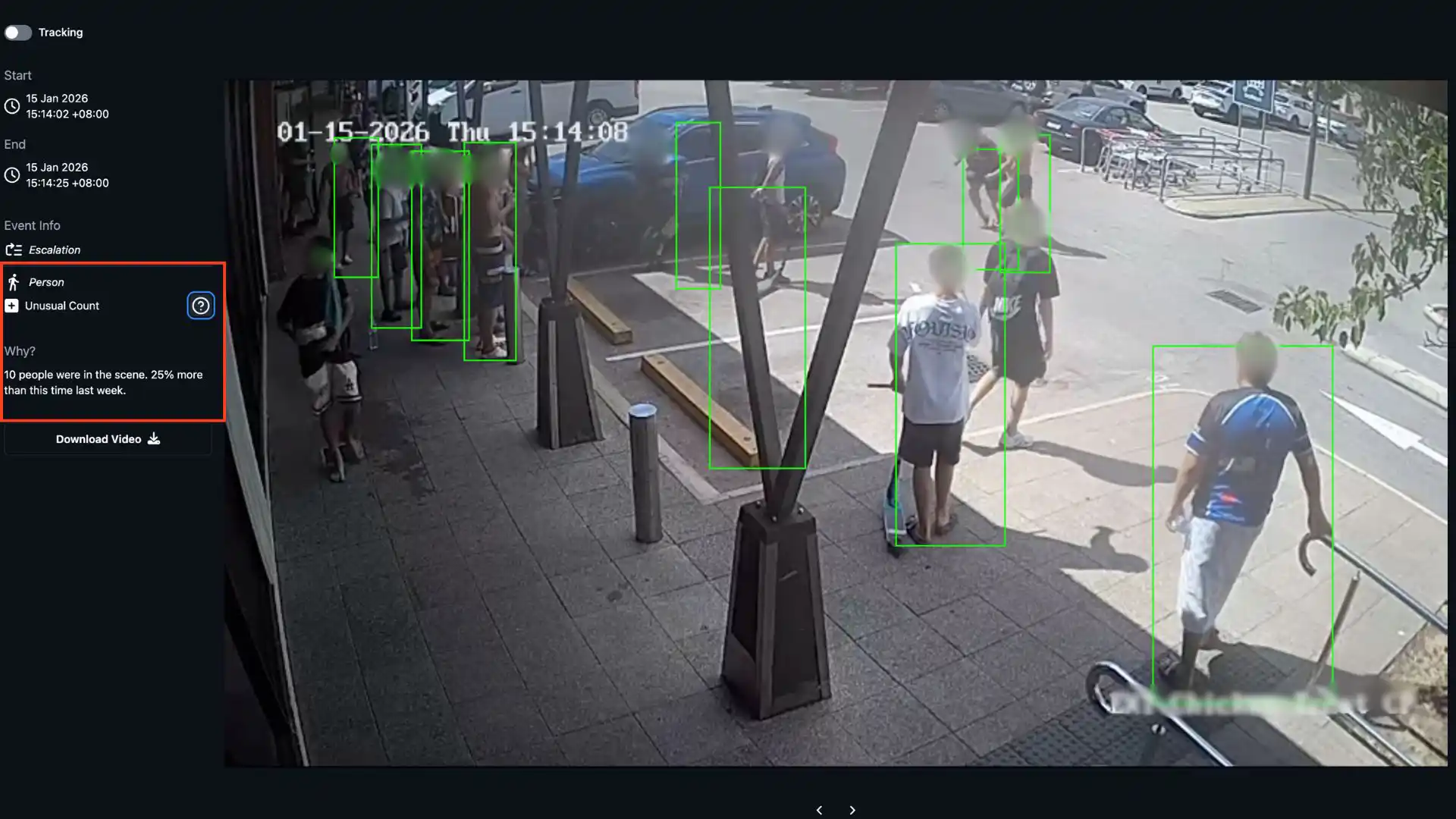
Explainable AI for Smarter, More Confident Security
icetana AI Event Explainability ensures that security teams don’t just receive events; they understand them.
By combining behavioural insights, historical comparisons, and visual clarity, Explainability empowers SOC teams to respond faster, operate more efficiently, and trust their AI-driven surveillance system.
.webp)

.webp)