Forensic Quick Find now launches from the Livewall & Playback

When an event happens on site, the first question is usually "where did that person go?" Until now, Forensic Quick Find could only start from an Safety and Security event. If the system had not raised an event, operators had to find the footage another way before they could search.
That step is gone. Operators can now launch Forensic Quick Find straight from the Livewall and Playback to start a forensic video search on what they are watching, whether or not icetana AI has flagged it.
For security teams, that means less time hunting for footage and more time acting on it. Operators respond while an incident is still unfolding, follow a person from start to finish and hand over evidence in one step.
Respond while the incident is still unfolding
Every minute spent finding footage is a minute the person gets further away. Now operators can start a forensic video search the moment they spot something on the Livewall. There is no waiting for the event to go to the highlights module.
Near-live playback with tracking overlays lets them confirm they have the right person before searching, so the first search counts. A Livewall search uses footage from the site that is between 60 seconds and 6 hours old, which keeps the focus on the incident in front of them rather than footage from across the network. Footage needs to be at least 60 seconds old before it can start a search.

Find someone even when nothing looked unusual
icetana AI's Safety and Security learns what normal activity looks like on each camera and raises an event when something is out of the ordinary. But not every incident looks unusual on camera. A child separated from their parents in a shopping centre, a vulnerable person who walks out of a care area or a student reported missing may have moved through the site like anyone else. No event was raised, because nothing they did stood out.
That no longer stops the search. If you know the person's last known location, go to Playback, find them on that camera and run Forensic Quick Find from there for the previous 6 hours. icetana AI shows where that person appears across the site's cameras, so the team can see where they went next.
In a missing person case, that can be the difference between searching a site floor by floor and heading straight to the right exit.

Get answers faster and trust what you find
When an incident is live, waiting on a search is time you do not have. We have improved search performance in several ways, so results come back faster and searches put less load on the system. On large deployments, where hundreds of cameras share the same servers, that leaves more capacity for everything else the system is doing.
Accuracy has improved too, so the correct person is found more often. Operators chase fewer false leads, spend less time scrolling through results and can act with more confidence on the ones they see.
Build an evidence pack in one step
When an incident goes to police, insurers or an internal review, the clock is ticking and nothing can be missed. Exporting clips one at a time is slow, and it is easy to leave one out.
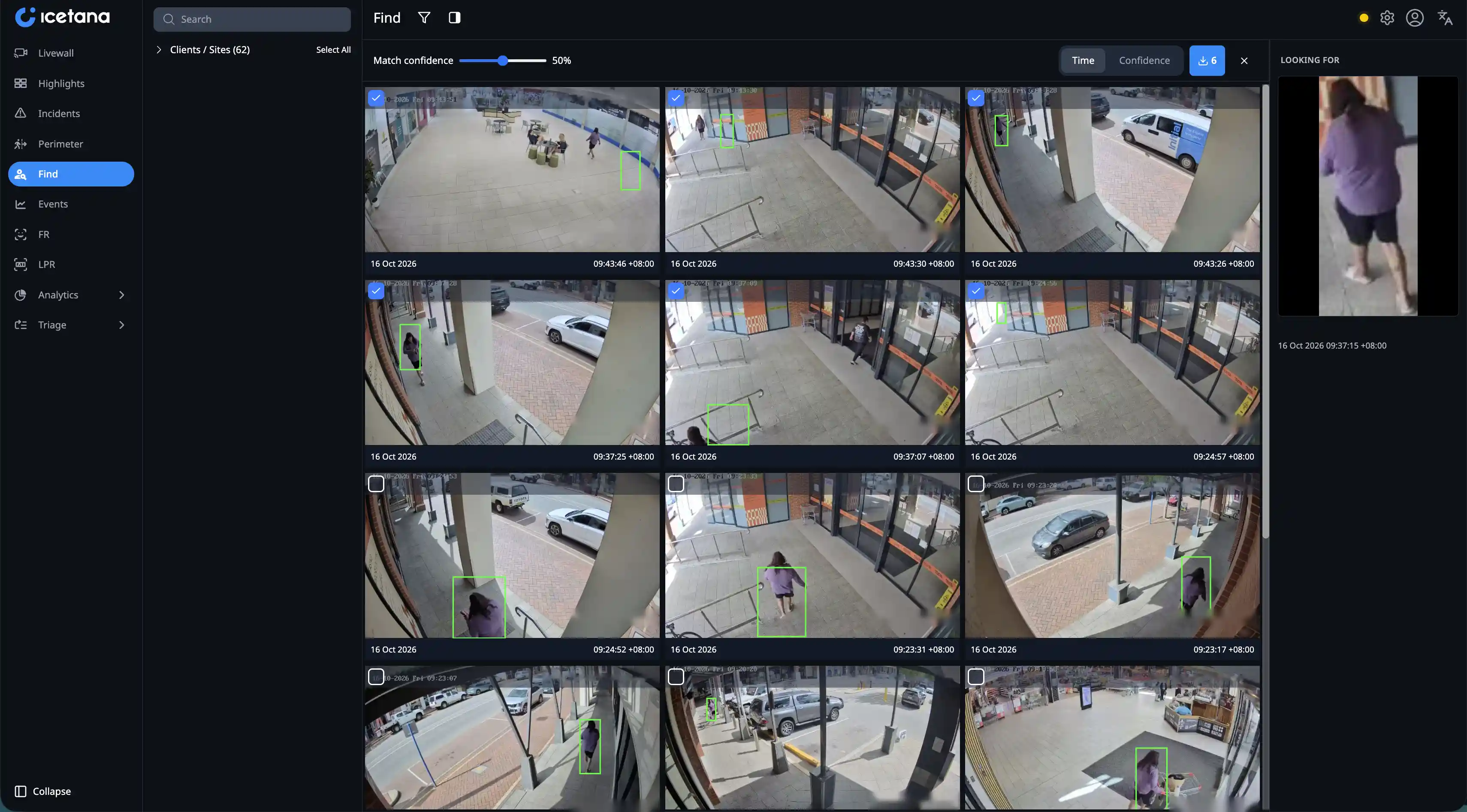
Now operators select every Forensic Quick Find result they need and download them together as a single zip file. A new rail of reference crops sits alongside the results, showing the person they searched for. They can check each result against the reference before adding it, so the evidence pack holds the right person and only the right person.
What this means for your security team
Put together, these changes shorten the path from "I just saw something" to a clip you can hand over.
Operators act on what they see without waiting for the system to raise an event. Investigators get a complete, connected record of a person's movements instead of scattered clips. Security managers get faster incident response from the same team and the same servers, with less time lost to manual searching.
Like the rest of icetana AI, Forensic Quick Find can run fully on-prem, so footage never has to leave your site.
Want to see it on your own cameras? Book a demo with the icetana AI team.
Frequently asked questions
What is Forensic Quick Find? Forensic Quick Find is icetana AI's forensic video search tool. It finds where a person of interest appears across your cameras, so operators can trace their movements in real time.
How does Forensic Quick Find help my security team? It cuts the time between spotting an incident and having evidence in hand. Operators can start a forensic video search from what they are watching, follow a person across cameras and export every relevant clip in one download.
Do I need an icetana AI event to start a search? No. You can still start from an icetana event, and you can now launch Forensic Quick Find directly from the Playback option.
Can I search for a missing person if no event was raised? Yes. Go to Playback, find the person at their last known location and launch Forensic Quick Find from there to see where they went next.
How far back does a Livewall search look? A search launched from the Livewall uses footage from the site that is between 60 seconds and 6 hours old. Activity from the last 60 seconds can't be used to start a search yet.
Can I export several results at once? Yes. Select the results you need and download them together as a single zip file.
What happens if I leave the page mid-search? The search is cancelled automatically, so it does not keep using system resources.
.webp)

.webp)